APlayerV22.0.3
Publisher Description


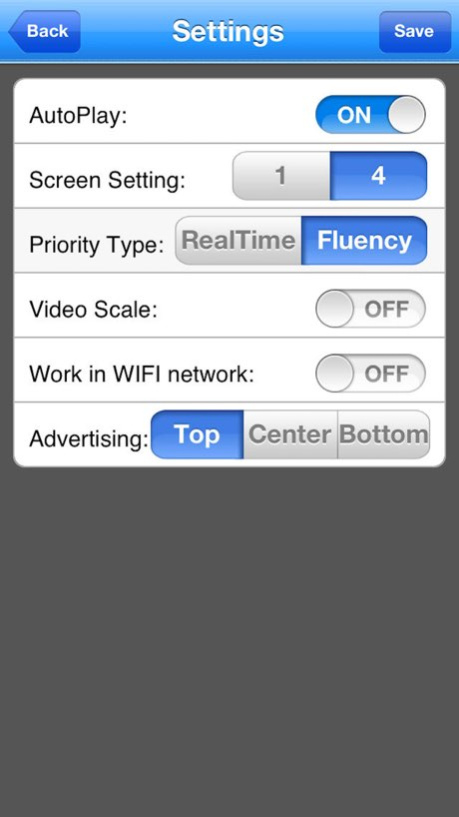
APlayerV2 is the advanced version of the APlayer and it allows Mobile phone users to view and control live video streams from cameras and video encoders.
Features:
iPhone and iPod Touch compatible.
Unlimited video on cellular and WIFI.
Support MultiChannel video encoder.
Support local playback.
Support device configuration parameters.
Support for IP address and dynamic domain name access(do not contain http://).
Support snapshot management.
Support for authentication.
Support for Pan, Tilt, & Zoom control.
Direct stream connection. without any third party server transfer.
Snapshot capability (while viewing live stream) to save to your local photo gallery.
Support for landscape and portrait mode.
Ability to change framerate and bitrate as desired for internal and remote users.
Demo device detail
address:222.32.23.23
mobile port:9106
user name:admin
password:123456
Version History bug fixes 2.0.3 11/08/2017 support ios11
bug fixes 2.0.1 09/28/2017 Support iphone5
Support setting allows only WIFI watch
Support setting whether viewed in proportion
Fix BUG 1.1.0 02/11/2013 1.0.0 08/16/2012
About APlayerV2
The company that develops APlayerV2 is Guangzhou Kedi Intelligence Technology Co., Ltd.. The latest version released by its developer is 2.0.3. This app was rated by 1 users of our site and has an average rating of 3.0.
To install APlayerV2 on your iOS device, just click the green Continue To App button above to start the installation process. The app is listed on our website since 2026-10-14 and was downloaded 178 times. We have already checked if the download link is safe, however for your own protection we recommend that you scan the downloaded app with your antivirus. Your antivirus may detect the APlayerV2 as malware if the download link is broken.
How to install APlayerV2 on your iOS device:
- Click on the Continue To App button on our website. This will redirect you to the App Store.
- Once the APlayerV2 is shown in the iTunes listing of your iOS device, you can start its download and installation. Tap on the GET button to the right of the app to start downloading it.
- If you are not logged-in the iOS appstore app, you'll be prompted for your your Apple ID and/or password.
- After APlayerV2 is downloaded, you'll see an INSTALL button to the right. Tap on it to start the actual installation of the iOS app.
- Once installation is finished you can tap on the OPEN button to start it. Its icon will also be added to your device home screen.
Program Details
General
System requirements
Download information
Pricing
Version History
version 2.0.3
posted on 2026-10-14
Version History bug fixes 2.0.3 11/08/2017 support ios11
bug fixes 2.0.1 09/28/2017 Support iphone5
Support setting allows only WIFI watch
Support setting whether viewed in proportion
Fix BUG 1.1.0 02/11/2013 1.0.0 08/16/2012
version 2.0.3
posted on 2026-09-05
Version History This app has been updated by Apple to prepare for watchOS 27 compatibility. No new features are included.
bug fixes 2.0.3 11/08/2017 support ios11
bug fixes 2.0.1 09/28/2017 Support iphone5
Support setting allows only WIFI watch
Support setting whether viewed in proportion
Fix BUG 1.1.0 02/11/2013 1.0.0 08/16/2012
version 2.0.3
posted on 2026-08-11
Version History This update from Apple will improve the functionality of this app. No new features are included.
bug fixes 2.0.3 11/08/2017 support ios11
bug fixes 2.0.1 09/28/2017 Support iphone5
Support setting allows only WIFI watch
Support setting whether viewed in proportion
Fix BUG 1.1.0 02/11/2013 1.0.0 08/16/2012
version 2.0.3
posted on 2017-11-08
Nov 8, 2017 Version 2.0.3
This app has been updated by Apple to display the Apple Watch app icon.
bug fixes
version 2.0.3
posted on 2017-11-08
Nov 8, 2017 Version 2.0.3
This app has been updated by Apple to use the latest Apple signing certificate.
bug fixes
version 2.0.3
posted on 2017-11-08
8. Nov. 2017 Version 2.0.3
bug fixes
version 2.0.3
posted on 2017-11-08
Nov 8, 2017 Version 2.0.3
bug fixes
version 2.0.3
posted on 2017-11-08
This app has been updated by Apple to display the Apple Watch app icon.
bug fixes
version 1.1.0
posted on 2012-08-16
version 2.0.3
posted on 1970-01-01
8 de nov. de 2017 Version 2.0.3
bug fixes
